Note
Go to the end to download the full example code.
Combining Interfaces
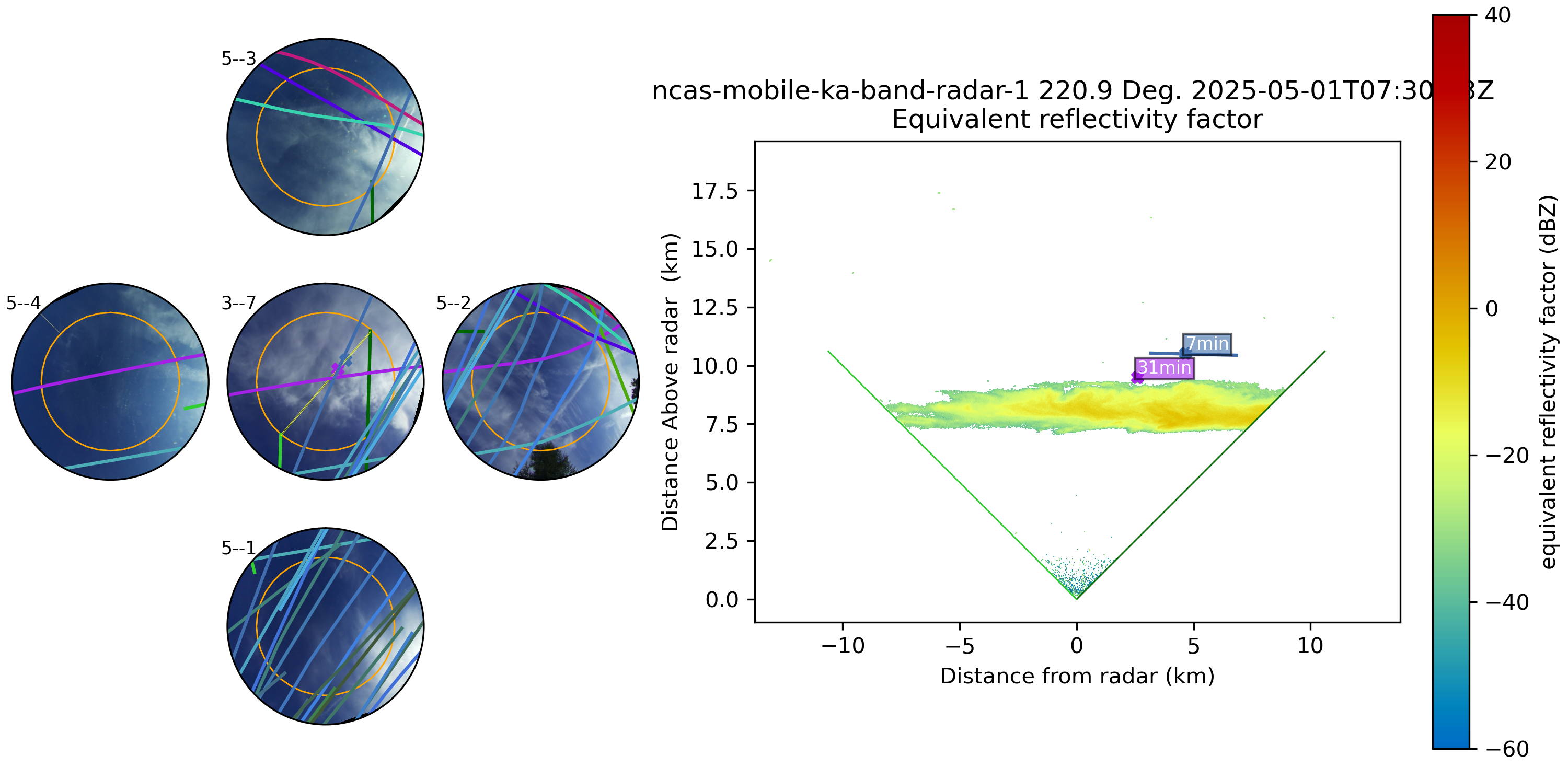
This example demonstrates the power of arguslib’s interface system by stacking multiple interfaces together. We will create a complex visualization that includes:
A CameraArray to show multiple camera views simultaneously.
A RadarInterface to overlay radar data on top of the camera array.
An AircraftInterface to plot flight tracks over both the cameras and radar data.
This showcases how different data sources can be combined into a single, comprehensive plot.
import datetime
from arguslib.aircraft import AircraftInterface
from arguslib.radar.radar import Radar
from arguslib.camera.camera_array import CameraArray
from arguslib.camera.undistorted_camera import UndistortedCamera
from arguslib.radar.radar_interface import RadarInterface
Stacking Interfaces for a Composite View
We can combine multiple cameras with flight tracks and radar data using nested interfaces. Here, we build up the final visualization step-by-step.
First, we define the core instruments: a Radar and a CameraArray composed of UndistortedCamera instances to provide a wide, distortion-free field of view.
dt = datetime.datetime(2025, 5, 1, 7, 30, 23)
radar = Radar.from_config("COBALT")
multicam = CameraArray.from_config("COBALTArray", camera_class=UndistortedCamera)
#
# Next, we wrap the `CameraArray` with a `RadarInterface` to overlay the radar
# data.
cri = RadarInterface(radar, multicam)
#
Finally, we wrap the RadarInterface with an AircraftInterface. This allows us to load flight data and plot aircraft tracks on top of the combined radar-on-camera view.
The show() method on the outermost interface renders the entire scene, showing the aircraft tracks and their intersection with the radar scan over the multi-camera background.
ai_on_ri_on_multicam = AircraftInterface(cri)
ai_on_ri_on_multicam.load_flight_data(dt)
ax = ai_on_ri_on_multicam.show(
    dt,
    tlen=45 * 60,
    color_icao=True,
)
Loading ADS-B data from: /disk1/Data/ADS-B/COBALT/20250501_ADS-B

Loading ADS-B data: 0acft [00:00, ?acft/s]
Loading ADS-B data: 3404acft [00:00, 34034.11acft/s]
Loading ADS-B data: 3814acft [00:00, 34031.55acft/s]
Attempting to assign ERA5 wind data to fleet...
Grouping flight data by time interval...
Assigning ERA5 wind data to fleet positions...

Processing 4D time chunks:   0%|          | 0/8 [00:00<?, ?it/s]
Processing 4D time chunks:  12%|█▎        | 1/8 [00:00<00:02,  2.87it/s]
Processing 4D time chunks:  25%|██▌       | 2/8 [00:00<00:02,  2.64it/s]
Processing 4D time chunks:  38%|███▊      | 3/8 [00:01<00:02,  2.36it/s]
Processing 4D time chunks:  50%|█████     | 4/8 [00:01<00:01,  2.29it/s]
Processing 4D time chunks:  62%|██████▎   | 5/8 [00:02<00:01,  2.27it/s]
Processing 4D time chunks:  75%|███████▌  | 6/8 [00:02<00:00,  2.29it/s]
Processing 4D time chunks:  88%|████████▊ | 7/8 [00:02<00:00,  2.36it/s]
Warning: Could not process wind chunk for 2025-05-01 21:00:00 to 2025-05-02 00:00:00: list index out of range

Processing 4D time chunks: 100%|██████████| 8/8 [00:03<00:00,  3.08it/s]
Processing 4D time chunks: 100%|██████████| 8/8 [00:03<00:00,  2.61it/s]
ERA5 wind assignment process complete.
Flight data loading and ERA5 wind assignment process complete.
Total running time of the script: (1 minutes 39.714 seconds)